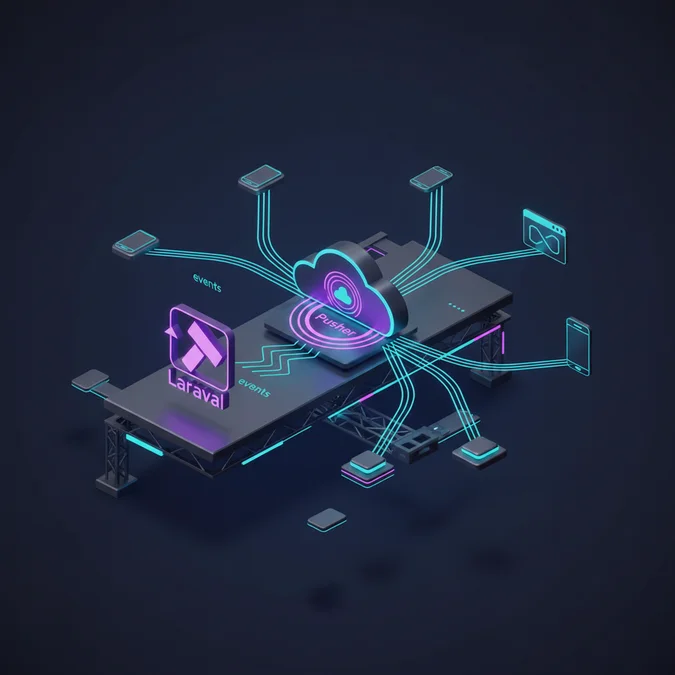

Laravel Pusher integration pairs Laravel’s internal event-broadcasting abstraction with Pusher Channels, a managed WebSockets infrastructure, enabling servers to dispatch events to browsers and mobile clients over persistent, bi-directional connections without polling. Developers publish broadcastable events in PHP, which dispatch over HTTP to Pusher’s distributed gateway, subsequently broadcasting to subscribing clients using the Pusher JavaScript SDK or Laravel Echo.
Think of this architecture like an air traffic control network. Instead of a pilot constantly radioing ground control every two seconds to ask if the runway is clear (polling), the flight crew maintains an open radio frequency. Ground control waits until an event occurs, such as a wind shift or runway clearance, and broadcasts the status update directly over the open channel. Laravel acts as ground control issuing the flight change, while Pusher serves as the radio transmission tower network keeping the open signal alive to thousands of aircraft simultaneously.
In high-throughput environments, wiring these layers together requires careful attention to queue workers, connection limits, channel authorization protocols, and payload structures. This technical guide examines how to implement, configure, debug, and scale Laravel event broadcasting using Pusher and compatible drop-in self-hosted socket clusters.
Understanding the Laravel Event Broadcasting Lifecycle
The core philosophy of Laravel’s event subsystem centers around decoupled execution. Standard framework events operate strictly in memory inside the PHP worker handling the incoming request. When an event implements the ShouldBroadcast interface, Laravel bifurcates this execution path: local listeners execute immediately, while broadcast listeners are pushed to an asynchronous queue.
This split prevents network input/output bottlenecks. Direct HTTP calls from a web server to an external WebSocket service add latency to user-facing requests. By deferring the outbound broadcast event to an asynchronous background worker running under Redis or Amazon SQS, the HTTP response returns to the client instantly. The background worker picks up the job, serializes the public properties of the event, and makes an authenticated REST API call to Pusher’s edge servers.
Upon receiving the REST payload, the Pusher edge cluster validates your application credentials, parses the target channel name, and distributes the message across its internal Pub/Sub fabric. The edge nodes holding active, long-lived WebSocket connections to connected browsers push the JSON payload down the socket pipe, where client-side listeners process the payload.
Prerequisites and Core Package Installation
Establishing the integration requires the official Pusher PHP SDK alongside client-side libraries. The Laravel core provides the broadcasting contracts, but the underlying transport mechanism depends on Pusher’s REST API client to post outbound socket events.
Run the following Composer command inside your project root to pull down the official Pusher PHP SDK:
composer require pusher/pusher-php-server "^7.2"On the front end, install Laravel Echo and the Pusher JavaScript client using your preferred Node package manager:
npm install --save-dev laravel-echo pusher-jsThese client dependencies decouple client logic from raw WebSocket handling. Laravel Echo wraps the native pusher-js library, managing subscription states, authentication handshakes for private channels, and event name binding without boilerplate connection logic.
Configuring Broadcasting Drivers and Environment Variables
Laravel manages broadcasting configurations inside config/broadcasting.php. Under the hood, the default driver setting references the BROADCAST_CONNECTION environment key (or BROADCAST_DRIVER in earlier framework releases). You must set this driver to pusher inside your root .env file.
BROADCAST_CONNECTION=pusher
QUEUE_CONNECTION=redis

PUSHER_APP_ID=1092834
PUSHER_APP_KEY=fae89102c98d7
PUSHER_APP_SECRET=9012384aedc0128
PUSHER_HOST=
PUSHER_PORT=443
PUSHER_SCHEME=https
PUSHER_APP_CLUSTER=mt1
Within config/broadcasting.php, review the connections.pusher array. It sets essential network flags such as TLS encryption and cluster routing parameters:
'pusher' => [
 'driver' => 'pusher'
 'key' => env('PUSHER_APP_KEY'),
 'secret' => env('PUSHER_APP_SECRET'),
 'app_id' => env('PUSHER_APP_ID'),
 'options' => [
 'cluster' => env('PUSHER_APP_CLUSTER'),
 'host' => env('PUSHER_HOST')? 'api-'env('PUSHER_APP_CLUSTER' 'mt1').'pusher.com'
 'port' => env('PUSHER_PORT' 443),
 'scheme' => env('PUSHER_SCHEME' 'https'),
 'encrypted' => true,
 'useTLS' => env('PUSHER_SCHEME' 'https') === 'https'
 ],
],
To ensure consistent security across transit, always verify that useTLS evaluates to true when transmitting sensitive user data over public networks.
Constructing Broadcastable Events with ShouldBroadcast
A broadcastable event is a standard Laravel event class that implements either Illuminate\Contracts\Broadcasting\ShouldBroadcast or ShouldBroadcastNow. The standard interface sends the broadcast payload through your configured queue system, whereas ShouldBroadcastNow dispatches the payload synchronously during the active HTTP request cycle.
Production systems should use ShouldBroadcast to safeguard latency. Below is an example event representing an incoming order in an enterprise pipeline:
<php

namespace App\Events;

use App\Models\Order;
use Illuminate\Broadcasting\Channel;
use Illuminate\Broadcasting\InteractsWithSockets;
use Illuminate\Broadcasting\PrivateChannel;
use Illuminate\Contracts\Broadcasting\ShouldBroadcast;
use Illuminate\Foundation\Events\Dispatchable;
use Illuminate\Queue\SerializesModels;

class OrderStatusUpdated implements ShouldBroadcast
{
 use Dispatchable, InteractsWithSockets, SerializesModels;

 public function __construct(public Order $order)
 {
 // Using PHP 8 constructor property promotion
 }

 public function broadcastOn(): array
 {
 return [
 new PrivateChannel('orders.' $this->order->id),
 ];
 }

 public function broadcastAs(): string
 {
 return 'order.updated'
 }

 public function broadcastWith(): array
 {
 return [
 'order_id' => $this->order->id,
 'status' => $this->order->status,
 'updated_at' => $this->order->updated_at->toIso8601String(),
 ];
 }
}
Notice the usage of broadcastWith(). By default, Laravel reflects across every public property on the event object and serializes it into the JSON payload. For complex applications, this can accidentally expose internal Eloquent relations or database fields. Explicitly defining broadcastWith() ensures clean data boundaries and limits payload size across your socket pipe.
Channel Typology: Public, Private, and Presence
Pusher and Laravel categorize real-time data distribution into three distinct channel models, each serving unique access patterns and authorization requirements:
- Public Channels (
Channel): Unauthenticated streams. Any client with the channel name can connect and receive data. Ideal for public dashboards, market tickers, or system maintenance announcements. - Private Channels (
PrivateChannel): Require cryptographic authorization. Before a client is allowed to listen to a private channel, the client library dispatches an authorization probe to an authenticated backend route. Ideal for notifications and account-specific feeds. - Presence Channels (
PresenceChannel): Built on top of private channels, adding bidirectional member awareness. When clients subscribe, they register their identity, enabling real-time listings of active users, join/leave events, and collaborative editing awareness.
Selecting the correct channel model is fundamental to managing socket overhead. Presence channels trigger additional administrative events whenever users join or disconnect, which increases Pusher message count compared to standard private streams.
Channel Authorization and Securing Socket Access
When a client subscribes to a private channel (for example, private-orders.45), Laravel Echo intercepts the request and sends an HTTP POST request to the /broadcasting/auth endpoint. This endpoint verifies user permissions using channel authorization rules defined in routes/channels.php.
To secure access to your private channels, write an explicit authorization callback returning a boolean evaluation or an identity array:
<php

use App\Models\Order;
use App\Models\User;
use Illuminate\Support\Facades\Broadcast;

Broadcast:channel('orders.{orderId}' function (User $user, int $orderId) {
 $order = Order:query()->select(['id' 'user_id' 'assigned_courier_id'])->find($orderId);

 if (! $order) {
 return false;
 }

 // Verify tenant ownership or elevated staff permissions
 return (int) $user->id === (int) $order->user_id
 || (int) $user->id === (int) $order->assigned_courier_id;
});
For presence channels, the authorization callback must return an array of identifying metadata rather than a boolean. This metadata is shared with other subscribers on the presence channel:
Broadcast:channel('collaboration-room.{roomId}' function (User $user, int $roomId) {
 if ($user->canAccessRoom($roomId)) {
 return [
 'id' => $user->id,
 'name' => $user->name,
 'avatar' => $user->avatar_url,
 ];
 }
 return false;
});
For developers designing secure distributed platforms, establishing proper boundary checks here is as vital as securing internal microservices, as outlined in our notes on systems architecture and security foundations.
Client-Side Integration with Laravel Echo and Pusher JS
The front-end client layer acts as the event receiver. By combining Laravel Echo with pusher-js, your web app handles connection drops, exponential backoff reconnects, and CSRF token transmission during channel authorization.
Initialize Echo in your client bootstrap file (e.g. resources/js/bootstrap.js):
import Echo from 'laravel-echo'
import Pusher from 'pusher-js'

window.Pusher = Pusher;

window.Echo = new Echo({
 broadcaster: 'pusher'
 key: import.meta.env.VITE_PUSHER_APP_KEY,
 cluster: import.meta.env.VITE_PUSHER_APP_CLUSTER,
 forceTLS: true,
 authEndpoint: '/broadcasting/auth'
 auth: {
 headers: {
 'X-CSRF-TOKEN' document.querySelector('meta[name="csrf-token"]').getAttribute('content'),
 },
 },
});
Once instantiated, subscribe to the defined channel and listen for the event alias defined in your event class:
const orderId = 42;

window.Echo.private(`orders.${orderId}`).listen('order.updated' (event) => {
 console.log('Received order update payload:' event);
 // Update UI state or trigger reactive store mutations
 document.getElementById('order-status-badge').innerText = event.status;
 }).error((error) => {
 console.error('Channel authorization failed or disconnected:' error);
 });
The preceding dot in .order.updated informs Laravel Echo that the event name is a fully qualified alias, preventing Echo from prefixing the client listener with the PHP namespace.
High-Throughput Queue Workers and Asynchronous Dispatching
Under real-world loads, the broadcasting subsystem is only as resilient as your background queue architecture. If an application attempts to broadcast synchronously across hundreds of events per second, outbound HTTP calls to Pusher can deplete PHP-FPM worker pools, resulting in request backpressure and 504 Gateway Timeouts.
To guarantee system isolation, route broadcasting jobs to a dedicated queue name within your queue configuration:
<php

namespace App\Events;

use Illuminate\Contracts\Broadcasting\ShouldBroadcast;

class HighFrequencyTelemetryEvent implements ShouldBroadcast
{
 // Send this event to a dedicated worker pool
 public string $broadcastQueue = 'broadcasts'
}
Configure your process manager (such as Supervisor or Kubernetes Pod definitions) to assign dedicated workers strictly to this queue:
[program:laravel-worker-broadcasts]
process_name=%(program_name)s_%(process_num)02d
command=php /var/www/artisan queue:work redis --queue=broadcasts --sleep=1 --tries=3 --max-time=3600
autostart=true
autorestart=true
user=www-data
numprocs=4
redirect_stderr=true
stdout_logfile=/var/www/storage/logs/worker.log
This operational decoupling ensures that unexpected spikes in front-end real-time alerts never starve database migrations, billing processes, or transactional email pipelines of computing resources.
Performance and Architectural Trade-Offs
Operating a real-time event pipeline introduces trade-offs between managed convenience and operational overhead. Choosing between managed platforms like Pusher Channels and self-hosted socket clusters depends on your engineering team’s capacity for infrastructure maintenance and throughput demands.
| Metric / Criterion | Managed Pusher Channels | Self-Hosted Socket Servers (e.g. Soketi) |
|---|---|---|
| Infrastructure Management | Zero server operations; global edge coverage managed by vendor | Requires horizontal scaling, Node.js clusters, and Redis coordination |
| Concurrent Connections | Bounded by subscription tier limits | Bounded only by memory, open file limits, and network throughput |
| Message Latency | 10ms to 40ms globally via regional edge distribution | Sub-10ms if located within same VPC / Cloud region as servers |
| Data Privacy Boundaries | Payloads traverse external third-party infrastructure | 100% on-premise or private VPC compliance |
| Framework Portability | Native compatibility across Laravel ecosystems | Fully API-compatible drop-in replacement using same SDK |
When engineering high-volume platforms, particularly in regulated environments such as fintech application development, security posture and infrastructure isolation frequently lead engineering teams to prioritize self-hosted solutions over public SaaS networks.
Self-Hosted Drop-in Alternatives: Soketi and Laravel Reverb
A distinct strength of the Laravel broadcasting architecture is driver interchangeability. Because modern self-hosted alternatives adhere to the Pusher v7 REST and WebSocket protocol specifications, your PHP code and client-side Echo scripts remain unmodified when migrating away from external SaaS infrastructure.
Soketi is an open-source, Node.js-based, C-optimized WebSocket server built specifically for Pusher-compatible workloads. It runs efficiently inside containerized Docker environments:
docker run -p 6001:6001 \
 -e SOKETI_DEBUG=1 \
 -e SOKETI_DEFAULT_APP_ID=app-id \
 -e SOKETI_DEFAULT_APP_KEY=app-key \
 -e SOKETI_DEFAULT_APP_SECRET=app-secret \
 quay.io/soketi/soketi:1.4-16-alpine
To point your Laravel backend to a local or internal Soketi instance, configure the host and port settings in .env without altering your broadcasting events:
PUSHER_APP_ID=app-id
PUSHER_APP_KEY=app-key
PUSHER_APP_SECRET=app-secret
PUSHER_HOST=127.0.0.1
PUSHER_PORT=6001
PUSHER_SCHEME=http
Laravel 11 introduced Laravel Reverb, a native first-party WebSocket server built in PHP using high-concurrency event loops. Reverb pairs directly with the framework while maintaining parity with Pusher protocol contracts, giving infrastructure teams native self-hosting capabilities within the standard PHP ecosystem.
Troubleshooting Latency, SSL Handshakes, and Connection Drops
Real-time event infrastructures feature distinct operational failure modes. Understanding where packets fail ensures fast mean time to resolution during incidents.
1. Private Channel 403 Forbidden Errors
If your browser establishes a socket connection but fails when subscribing to a private channel, verify that your client carries an authenticated session cookie or API token. If you use Laravel Sanctum or API tokens, ensure your Echo initialization points to the correct authentication headers. Check routes/channels.php to confirm that the callback parameter names match your channel regex tokens exactly.
2. SSL Certificate Mismatches
When running through custom domains or load balancers, client libraries can drop connections silently if the TLS certificate does not match the WebSocket endpoint. If routing WebSockets through Cloudflare or an AWS Application Load Balancer (ALB), ensure WebSocket upgrades are explicitly allowed. In ALB configurations, verify that idle timeout limits are extended beyond 60 seconds to prevent premature socket termination.
3. Queue Worker Serialization Drift
If an event broadcasts stale data, remember that serializing an Eloquent model with SerializesModels only saves the primary key ID. When the background queue worker picks up the job to broadcast to Pusher, it executes a clean query from the database. If your worker processes the job before an outer database transaction commits, the worker might fetch the old record state. Wrap your dispatch calls inside database transaction lifecycle hooks:
use Illuminate\Support\Facades\DB;

DB:transaction(function () use ($order) {
 $order->update(['status' => 'processing']);

 // Dispatches only after the transaction successfully commits
 OrderStatusUpdated:dispatch($order)->afterCommit();
});
Benchmarking Payload Sizes and Network Saturation
WebSocket framing introduces light frame headers (typically 2 to 10 bytes), but payload sizes can balloon quickly if events are not designed intentionally. While a REST API response can afford to deliver large nested JSON documents, WebSocket broadcasting scales across N active subscribers simultaneously. If an event sends a 50KB payload to 10,000 connected clients on a single channel, that single dispatch generates 500 megabytes of outbound bandwidth consumption within milliseconds.
Consider this baseline efficiency rule: WebSockets are signaling pipes, not database bulk-transfer pipes. Rather than serializing comprehensive model hierarchies, transmit light change notifications containing resource IDs and state flags. The client can either consume the delta directly or query a cached REST API endpoint for expanded payloads.
This selective payload discipline is a hallmark of modern rapid application development platforms, where preserving bandwidth and reducing CPU deserialization cycles is essential for supporting thousands of concurrent users.
Exploring Core Laravel Capabilities
Event broadcasting represents just one foundational subsystem inside the broader Laravel ecosystem. To deepen your operational understanding of queue architectures, service providers, database tuning, and caching layers, review our comprehensive index of framework architecture articles.
Explore our complete Laravel, Basics directory for more guides.
Integrating Laravel with Pusher Channels or Pusher-compatible socket servers creates a decoupled, highly responsive architecture for real-time web applications. By understanding the division of labor between asynchronous background queues, channel authorization logic, and front-end socket lifecycle handlers, system designers can build robust event-driven workflows that maintain low response latencies.
Whether you choose managed Pusher infrastructure for operational simplicity or deploy self-hosted clusters like Soketi and Laravel Reverb to satisfy strict VPC data boundaries, the programming interface inside Laravel remains constant. Focus on minimal event payloads, configure resilient queue workers, and strictly guard channel authorization endpoints to run clean, production-grade real-time systems.