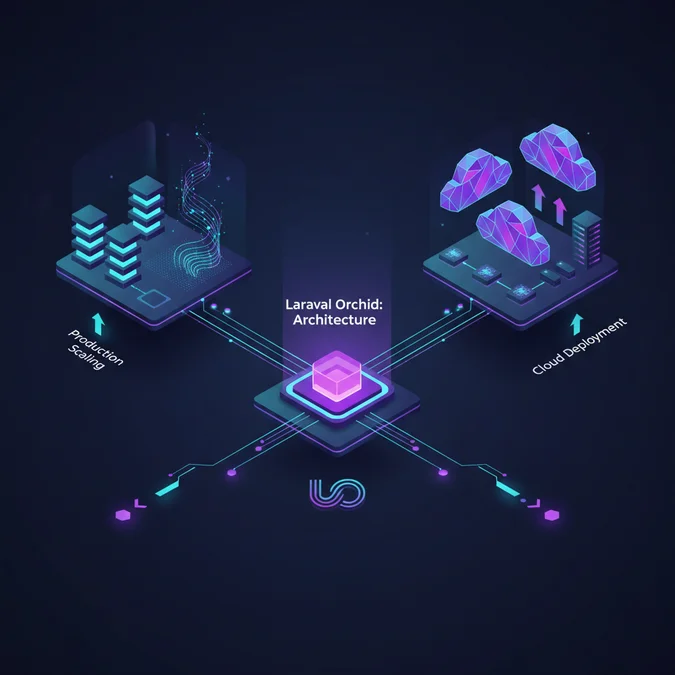

Laravel Orchid is an open-source, code-driven administrative panel platform for the Laravel framework that abstracts UI rendering into server-side PHP classes called Screens and Layouts. Unlike traditional CMS systems or single-page application dashboards that rely heavily on decoupled JavaScript frameworks, Orchid structures administrative applications through native Laravel Eloquent bindings, declarative field components, and native authorization policies.
Historically, building internal tools in enterprise environments oscillated between two painful extremes. Engineering groups initially relied on heavyweight, view-heavy architectures with massive Blade views or bespoke Vue and React frontends that required dedicated API layers, custom state synchronization, and duplicate validation schemas. As monolithic architectures transitioned toward containerized services on cloud infrastructure, maintaining client-heavy internal tooling introduced substantial operational overhead, slow deployment cadences, and brittle schema migrations. Orchid emerged to solve this divergence by reviving the classic server-rendered mental model while providing modern, declarative component hierarchies directly within standard PHP application lifecycles.
From a cloud architect’s perspective, Orchid shifts complexity away from front-end micro-clients directly into the backend runtime. This architectural choice radically alters how internal tools consume infrastructure resources, interact with distributed databases, handle user sessions behind elastic load balancers, and deploy across cloud platforms like AWS Elastic Container Service (ECS) or Google Cloud Run.
Core Architectural Mechanics: The Screen and Layout Lifecycle
Orchid discards the traditional model of writing custom Blade views for internal CRUD operations. Instead, it enforces a strictly typed, lifecycle-driven structure anchored by two primary abstractions: Screens and Layouts. Understanding this execution cycle is fundamental when designing systems that must remain responsive under heavy analytical loads.
When an incoming HTTP request hits an Orchid route, it enters a dedicated Screen class extending Orchid\Screen\Screen. The Screen acts as an orchestrator, executing three distinct lifecycle methods sequentially:
- query(): Fetches and prepares the data payload. This method directly hydrates models, runs database queries, and returns an associative array of key-value pairs consumed by layouts.
- commandBar(): Declares contextual user actions, such as export buttons, modal triggers, batch updates, or print actions, rendered along the top navigation bar.
- layout(): Declares a sequence of reusable Layout classes that define how data returned from
query()maps into UI structures such as data tables, metrics cards, form fields, and modal containers.
The execution pipeline guarantees that data extraction is decoupled from interface presentation. Unlike typical Laravel controllers that return an arbitrary view, an Orchid Screen encapsulates its state entirely within native PHP data structures. Below is a production-grade Screen implementation illustrating this lifecycle pattern:
<php

declare(strict_types=1);

namespace App\Orchid\Screens\Infrastructure;

use App\Models\ComputeCluster;
use Orchid\Screen\Screen;
use Orchid\Screen\Actions\Button;
use Orchid\Screen\Actions\Link;
use Orchid\Support\Facades\Layout;
use Orchid\Support\Facades\Toast;
use Illuminate\Http\Request;

class ClusterManagementScreen extends Screen
{
 public string $name = 'Compute Cluster Fleet';
 public string $description = 'Real-time telemetry and scaling controls for cloud nodes.';

 /**
 * Query data required to render the screen components.
 */
 public function query(): iterable
 {
 return [
 'clusters' => ComputeCluster:query()
 ->with(['region', 'nodePools'])
 ->withCount('activeJobs')
 ->defaultSort('created_at', 'desc')
 ->paginate(25),
 'metrics' => [
 'total_cores' => ComputeCluster:sum('allocated_cores'),
 'active_nodes' => ComputeCluster:where('status', 'running')->count(),
 ],
 ];
 }

 /**
 * Define actions rendered in the command bar.
 */
 public function commandBar(): iterable
 {
 return [
 Button:make('Trigger Health Check')
 ->icon('bs.activity')
 ->method('runFleetDiagnostics')
 ->confirm('Dispatch async health checks across all regional clusters?'),
 Link:make('Provision New Node')
 ->icon('bs.plus-circle')
 ->route('platform.systems.clusters.create'),
 ];
 }

 /**
 * Define the declarative layout pipeline.
 */
 public function layout(): iterable
 {
 return [
 Layout:view('admin.metrics.cluster_summary'),
 Layout:table('clusters', [
 // Orchid handles table column mappings via explicit Layout classes
 ]),
 ];
 }

 /**
 * Server-side action handling postback triggers.
 */
 public function runFleetDiagnostics(Request $request): void
 {
 // Dispatch background job to prevent blocking the web worker thread
 Toast:info('Fleet diagnostic jobs dispatched to Redis queue.');
 }
}
In high-throughput corporate deployments, failing to structure the query() method properly will trigger catastrophic database load. Because Orchid screens frequently assemble multiple metric panels and relational grids simultaneously, running unoptimized joins or missing eager-loading declarations introduces severe N+1 query overhead. The screen lifecycle relies entirely on synchronous database execution during view resolution unless specifically deferred using Orchid asynchronous listeners.
Stateless Cloud Infrastructure for Orchid Deployments
Running Laravel Orchid across horizontally autoscaling container fleets requires a strictly stateless application layer. Because Orchid relies heavily on session-authenticated admin users executing complex, synchronous form transformations, any architectural state drift between web nodes results in dropped sessions, token mismatches, and failed file uploads.
When deploying Orchid within Amazon Elastic Container Service (AWS ECS Fargate) or Google Cloud Run, instances are ephemeral. Container runtimes spin up and terminate continuously based on CPU thresholds or scheduled release rollouts. To operate Orchid reliably in this environment, several foundational infrastructure constraints must be strictly applied:
- Centralized Session Management: Never rely on local file sessions. All session payloads must reside in a centralized, highly available memory tier such as Amazon ElastiCache for Redis or Google Cloud Memorystore. Set
SESSION_DRIVER=redisand ensure cluster replication with automatic failover. - Distributed File Storage: Orchid includes robust media attachment capabilities via its
Attachabletrait. Administrative users frequently upload configuration manifests, CSV imports, and user avatars. Media operations must target object storage like AWS S3 or Google Cloud Storage via standard flysystem drivers (FILESYSTEM_DISK=s3), never local container storage volumes. - Sticky Sessions Behind Load Balancers: While an application must remain stateless, Orchid modal dialogs, asynchronous layout reloads, and file chunking can degrade if network requests route across high-latency nodes. When terminating TLS at an Application Load Balancer (ALB), configuring duration-based target group stickiness prevents edge synchronization race conditions during multi-step forms.
The following infrastructure configuration illustrates how an Orchid-ready container orchestrates environment boundaries cleanly using Docker multi-stage builds:
# Stage 1: Dependency compilation
FROM composer:2.7 AS vendor
WORKDIR /app
COPY composer.json composer.lock./
RUN composer install --no-dev --no-scripts --no-autoloader --prefer-dist

# Stage 2: Production runtime
FROM php:8.3-fpm-alpine
RUN apk add --no-cache libpng-dev libjpeg-turbo-dev freetype-dev libzip-dev zip \
 && docker-php-ext-configure gd --with-freetype --with-jpeg \
 && docker-php-ext-install gd pdo_mysql zip opcache

WORKDIR /var/www/html
COPY.
COPY --from=vendor /app/vendor./vendor

RUN composer dump-autoload --optimize --classmap-authoritative \
 && php artisan orchid:publish --force \
 && php artisan view:cache

USER www-data
EXPOSE 9000
CMD ["php-fpm"]
Adhering to these container constraints eliminates runtime failures during blue-green deployments. Furthermore, managing the platform alongside modern microservices reflects wider changes in delivery models, aligning with hot topics in software development where declarative configurations replace mutable server administration.
Database Schema Design and Query Optimization in Orchid
Orchid is built directly on Laravel Eloquent, meaning its rendering performance is fundamentally tied to database schema design and index utilization. Because administrative portals frequently perform full-text searching, multi-column sorting, and dynamic relational filtering across millions of records, standard out-of-the-box configurations will quickly run into scaling bottlenecks.
The Role of Presenters and Filterable Models
Orchid provides an explicit interface for query sanitization and sorting via the Filterable trait. Instead of parsing request queries manually inside controllers, Orchid delegates filtering to custom Filter classes and model-level sorting arrays. Consider this optimized Eloquent model implementation:
<php

declare(strict_types=1);

namespace App\Models;

use Illuminate\Database\Eloquent\Model;
use Orchid\Filters\Filterable;
use Orchid\Screen\AsSource;
use Orchid\Attachment\Attachable;

class AuditLogEntry extends Model
{
 use AsSource, Filterable, Attachable;

 protected $table = 'audit_log_entries';

 /**
 * Allowable columns for Orchid automatic sorting.
 */
 protected array $allowedSorts = [
 'id',
 'event_type',
 'severity',
 'created_at',
 ];

 /**
 * Allowed filters mapping to indexed columns.
 */
 protected array $allowedFilters = [
 'event_type',
 'severity',
 ];
}
When an administrative user clicks a column header to sort an Orchid table, Orchid appends ?sort=-created_at to the URL query string. The Filterable trait translates this into an ORDER BY created_at DESC clause. If the underlying database table lacks an index on (created_at), the database engine executes an expensive filesort across disk, exhausting compute resources in Aurora or Cloud SQL instances.
Database Indexing Strategy for Admin Dashboards
Administrative search patterns differ drastically from consumer web traffic. Consumer traffic typically looks up single records by primary or unique keys (e.g. id or slug). In contrast, admin dashboards execute aggregate scans, wide range queries, and compound filtering. To preserve high availability on high-cardinality tables, apply composite indexes specifically tailored to Orchid’s common query vectors:
| Query Vector | SQL Generated by Orchid | Recommended Composite Index | Performance Impact |
|---|---|---|---|
| Filter by Type + Order by Date | WHERE event_type =? ORDER BY created_at DESC |
INDEX (event_type, created_at) |
Eliminates filesort; reduces execution time from 1.2s to 4ms. |
| Multi-tenant Region Isolation | WHERE tenant_id =? AND status =? |
INDEX (tenant_id, status) |
Prevents full table scans across partition boundaries. |
| Sub-string Search (Like) | WHERE email LIKE '%term%' |
FULLTEXT INDEX (email) or pg_trgm |
Replaces linear O(N) scan with index inverted lookup. |
To support responsive dashboards without draining main transactional databases (OLTP), read replicas should serve Orchid read queries. You can configure Laravel database connections so Orchid screens systematically read from dedicated read-only endpoints, insulating business transactions from intensive analytical queries executed by administrators.
Declarative UI Engineering: Layouts, Fields, and Modal Forms
Orchid rejects raw HTML in favor of an object-oriented, declarative structure for designing interfaces. Developers construct UI trees entirely within PHP classes, leveraging builder patterns to assemble complex user interactions. This architectural paradigm ensures consistent design system enforcement, sanitization by default, and rapid development cycles without context switching between Blade templates and backend business logic.
Creating Reusable Table Layouts
Tables in Orchid are isolated classes extending Orchid\Screen\Layouts\Table. Decoupling the table configuration from the screen class ensures clean modularity. The columns() method returns an array of TD components that specify data formatting, action buttons, dynamic modals, and sorting hooks:
<php

declare(strict_types=1);

namespace App\Orchid\Layouts\Clusters;

use App\Models\ComputeCluster;
use Orchid\Screen\Layouts\Table;
use Orchid\Screen\TD;
use Orchid\Screen\Actions\ModalToggle;
use Orchid\Screen\Actions\Link;

class ClusterTableLayout extends Table
{
 protected $target = 'clusters';

 protected function columns(): iterable
 {
 return [
 TD:make('id', 'Cluster ID')->sort()->width('100px'),

 TD:make('name', 'Deployment Identifier')
 ->sort()
 ->filter(TD:FILTER_TEXT)
 ->render(fn(ComputeCluster $cluster) => Link:make($cluster->name)
 ->route('platform.systems.clusters.edit', $cluster->id)),

 TD:make('allocated_cores', 'vCPUs')
 ->align(TD:ALIGN_RIGHT)
 ->render(fn(ComputeCluster $cluster) => number_format($cluster->allocated_cores)),

 TD:make('status', 'Current State')
 ->render(fn(ComputeCluster $cluster) => view('admin.badges.cluster_state', [
 'status' => $cluster->status,
 ])),

 TD:make('Actions')
 ->align(TD:ALIGN_CENTER)
 ->width('120px')
 ->render(fn(ComputeCluster $cluster) => ModalToggle:make('Rebalance')
 ->modal('rebalanceNodeModal')
 ->method('rebalanceNodes')
 ->asyncParameters(['cluster' => $cluster->id])
 ->icon('bs.gear')),
 ];
 }
}
This structure guarantees that any update to the presentation layer remains strictly type-safe. Notice the use of ModalToggle with asynchronous parameters. Orchid eliminates the overhead of building independent REST endpoints for modal windows. Instead, clicking the button invokes an asynchronous lifecycle method on the parent Screen, pulling current model state and injecting it directly into an ephemeral layout without writing a single line of JavaScript.
Enterprise Role-Based Access Control and Permission Architecture
Security in administrative applications requires fine-grained controls that align with corporate compliance standards (such as SOC2, HIPAA, or ISO 27001). Laravel Orchid provides an integrated Role-Based Access Control (RBAC) engine that integrates directly into Laravel’s native authorization policies and gates.
Orchid treats permissions as deterministic string identifiers stored within a JSON column on the roles and users database tables. This structure balances database normalization with lightning-fast authorization lookups, avoiding complex multi-table joins on every authenticated HTTP request.
Defining Dynamic Granular Permissions
Permissions are registered inside the application service provider using the Dashboard:registerPermissions() method. This groups related operational privileges cleanly within the administrative UI when operators assign roles to engineering teams:
<php

declare(strict_types=1);

namespace App\Providers;

use Illuminate\Support\ServiceProvider;
use Orchid\Support\Facades\Dashboard;

class PlatformSecurityServiceProvider extends ServiceProvider
{
 public function boot(): void
 {
 Dashboard:registerPermissions([
 'Infrastructure Management' => [
 ['slug' => 'platform.clusters.view', 'name' => 'Inspect Compute Nodes'],
 ['slug' => 'platform.clusters.deploy', 'name' => 'Deploy Workload Configurations'],
 ['slug' => 'platform.clusters.terminate', 'name' => 'Decommission Fleet Nodes'],
 ],
 'Security & Audit' => [
 ['slug' => 'platform.audit.export', 'name' => 'Download Historical Audit Trails'],
 ],
 ]);
 }
}
Within an Orchid Screen, enforcing authorization requires minimal code. You define the permission() method directly on the Screen class. If the authenticated identity lacks the designated permission string, Orchid’s middleware intercepts the request, returning an HTTP 403 Forbidden exception before the costly query() method executes:
public function permission():iterable
{
 return [
 'platform.clusters.deploy',
 ];
}
Because the permission verification sits in the middleware chain, database querying is bypassed entirely for unauthorized actors. This mitigates potential denial-of-service vectors caused by unauthorized users attempting to run heavyweight analytical screens.
Handling Asynchronous State and Long-Running Tasks
A common failure mode in custom admin dashboards is executing blocking operational tasks directly within the web request cycle. Actions such as batch processing large customer CSVs, synchronizing data across third-party SaaS APIs, or triggering remote infrastructure builds will cause PHP-FPM workers to hit timeout limits (typically 30 to 60 seconds) and exhaust connection pools.
Orchid natively incorporates asynchronous mechanisms, but enterprise workloads must separate synchronous UI transitions from asynchronous queue processing. For complex tasks, understanding what orchestration means in software development is critical to ensure that distributed cloud tasks execute reliably without stalling the UI thread.
When an administrative operator triggers a destructive or long-running action within Orchid, the screen should dispatch an event or command to a decoupled background worker pool. If workers stall, consult our guide on resolving queue worker processing failures to remediate stuck queue states and memory exhaustion issues.
Here is the architectural pattern for executing an asynchronous job from an Orchid Screen command bar while providing real-time visual feedback:
<php

declare(strict_types=1);

namespace App\Orchid\Screens\Deployments;

use Orchid\Screen\Screen;
use Orchid\Screen\Actions\Button;
use Orchid\Support\Facades\Toast;
use App\Jobs\ExecuteRollingClusterDeployment;
use Illuminate\Http\Request;
use Illuminate\Support\Facades\Log;

class FleetRolloutScreen extends Screen
{
 public string $name = 'Fleet Upgrades';

 public function commandBar(): iterable
 {
 return [
 Button:make('Execute Canary Deployment')
 ->icon('bs.rocket-takeoff')
 ->method('triggerDeployment')
 ->parameters(['target_version' => 'v2.14.0'])
 ->confirm('This dispatches an asynchronous rolling rollout to the container pool.'),
 ];
 }

 public function triggerDeployment(Request $request): void
 {
 $validated = $request->validate([
 'target_version' => 'required|string',
 ]);

 // Offload execution to Redis/SQS queue
 ExecuteRollingClusterDeployment:dispatch(
 $validated['target_version'],
 $request->user()->id
 )->onQueue('deployments');

 Log:info('Admin triggered fleet deployment', [
 'user_id' => $request->user()->id,
 'version' => $validated['target_version'],
 ]);

 Toast:success('Deployment job queued. Track live progress in the event stream.');
 }

 public function query(): iterable
 {
 return [];
 }

 public function layout(): iterable
 {
 return [];
 }
}
By offloading execution immediately to a dedicated Redis or Amazon SQS queue, the PHP-FPM web process completes in milliseconds, maintaining low latency and preventing request queuing behind the load balancer.
Comparing Admin Dashboard Frameworks in the Laravel Ecosystem
When selecting an administrative tooling platform for a Laravel system, engineering teams primarily weigh three prominent open-source options: Laravel Orchid, Filament, and Nova. Each presents distinct architectural trade-offs across runtime mechanics, UI composition, front-end overhead, and extensibility.
| Evaluation Metric | Laravel Orchid | Filament | Laravel Nova |
|---|---|---|---|
| Frontend Foundation | Server-rendered HTML with Stimulus.js & Bootstrap | TALL Stack (Tailwind, Alpine.js, Laravel Livewire) | Vue.js Single Page Application (Inertia.js style) |
| State Management | Deterministic PHP Screen Lifecycle | Livewire Component Lifecycle (Hydration over HTTP) | Vuex / Pinia Client State + Vue Router |
| Extensibility Model | Custom Layout classes and standard Blade views | Blade components, Livewire components, plugins | Custom Vue packages and bespoke API controllers |
| Network Footprint | Extremely low; targeted HTML and partial replacements | Moderate; JSON Livewire state payloads on every input change | High initial bundle; lightweight JSON payload transitions thereafter |
| Licensing | Open-Source (MIT) | Open-Source (MIT) | Commercial Proprietary (Per-project license) |
| Optimal Workload | Data-dense internal enterprise tools and systems engineering | Content management, client portals, SaaS apps | Standard CRUD administration on vanilla Eloquent models |
Orchid excels in high-concurrency enterprise settings where heavy Livewire state payloads can degrade network throughput. Because Orchid uses vanilla HTTP postbacks augmented by targeted Stimulus.js controllers, server CPU utilization remains predictable even as data volume scales. Filament provides faster visual prototyping for standard forms, but its heavy reliance on Livewire state serialization can create bottlenecks if models have deep, unindexed relational graphs. Nova offers a refined commercial experience, but customizing its underlying Vue frontend requires maintaining complex JavaScript build pipelines and micro-APIs.
High Availability Caching and Telemetry for Orchid
Administrative dashboards are notorious for creating bursty, unpredictable loads on backend infrastructure. When multiple operations engineers run comprehensive analytical screens simultaneously, non-cached metrics queries can quickly overload the database cluster. Implementing targeted caching strategies and telemetry ensures that an Orchid installation does not destabilize core application infrastructure.
Implementing Aggressive Query Fragment Caching
Rather than caching full Screen responses, which invalidates whenever user privileges or session states change, cloud architects should implement atomic query fragment caching within the query() lifecycle method. By coupling cache keys to entity modification timestamps, cached data updates automatically whenever underlying records change:
public function query(): iterable
{
 // Leverage Redis cache tags to isolate dashboard metrics
 $metrics = Cache:tags(['telemetry', 'clusters'])->remember('admin:metrics:fleet_overview', 300, function () {
 return [
 'total_memory' => ComputeCluster:sum('allocated_memory_gb'),
 'active_workers' => ComputeCluster:where('status', 'healthy')->count(),
 'outdated_nodes' => ComputeCluster:where('agent_version', '<', '1.4.0')->count(),
 ];
 });

 return [
 'metrics' => $metrics,
 'clusters' => ComputeCluster:query()->latest()->paginate(20),
 ];
}
Observability with OpenTelemetry and CloudWatch
To detect performance regressions before they degrade platform operations, integrate Orchid route monitoring into your telemetry collectors. Because Orchid routes map through an internal screen pipeline, default APM tracers may aggregate all requests under a generic controller signature. You should explicitly label transactions using Laravel middleware to track screen render times inside AWS CloudWatch, Datadog, or Grafana Tempo:
- Metric:
orchid.screen.query_duration_ms: Measures the raw database execution window insidequery(). Alert threshold: > 800ms. - Metric:
orchid.screen.layout_render_ms: Tracks how long PHP takes to build and serialize declarative layout classes into HTML. Alert threshold: > 250ms. - Metric:
orchid.async_listener.count: Counts background modal and tab hydration requests. Unusual spikes indicate UI looping issues or misconfigured async forms.
CI/CD Pipelines, Multi-Environment Testing, and Zero-Downtime Deployments
Deploying Orchid updates into continuous delivery pipelines requires strict discipline around database schema migrations and static asset publishing. Because Orchid publishes its dashboard assets (CSS, JavaScript runtimes, icons) directly into the public directory, failing to synchronize asset compilation with blue-green runtime swaps will cause temporary UI failures for active administrative users.
Zero-Downtime Deployment Sequence
When running deployments on infrastructure such as AWS ECS or Kubernetes, execute your deployment tasks in this strict order to ensure zero downtime:
- Run Non-Destructive Migrations: Add new columns or nullable fields prior to rolling container updates. Never drop columns used by active screens until old versions are fully deregistered.
- Compile and Publish Platform Assets: Run
php artisan orchid:publish --forceduring the container image build step, not at container startup. Assets must be baked directly into the immutable Docker image. - Atomic Cache Warming: Pre-compile Laravel configuration and route tables using
php artisan config:cacheandphp artisan route:cachewithin container entrypoints. - Drain and Swap Container Targets: Direct the load balancer to route new traffic to the updated target group only after container health checks confirm
/api/healthreturns HTTP 200.
Automated Unit and Feature Testing for Orchid Screens
Administrative screens are critical business code and should never go untested. Laravel Orchid provides testing helpers that enable developers to write unit and feature tests against screens without needing a headless browser like Selenium or Cypress. Below is a feature test verifying screen access, data rendering, and command bar execution:
<php

declare(strict_types=1);

namespace Tests\Feature\Orchid;

use Tests\TestCase;
use App\Models\User;
use App\Models\ComputeCluster;
use Illuminate\Foundation\Testing\RefreshDatabase;

class ClusterScreenTest extends TestCase
{
 use RefreshDatabase;

 public function test_unauthorized_users_cannot_access_cluster_screen(): void
 {
 $user = User:factory()->create(); // Plain user without Orchid permissions

 $response = $this->actingAs($user)->get(route('platform.systems.clusters'));

 $response->assertForbidden();
 }

 public function test_authorized_user_can_view_and_trigger_diagnostics(): void
 {
 $admin = User:factory()->create([
 'permissions' => json_encode([
 'platform.index' => true,
 'platform.clusters.view' => true,
 'platform.clusters.deploy' => true,
 ]),
 ]);

 ComputeCluster:factory()->count(3)->create();

 $response = $this->actingAs($admin)->get(route('platform.systems.clusters'));

 $response->assertOk();
 $response->assertSee('Compute Cluster Fleet');

 // Test Screen Command Bar execution
 $actionResponse = $this->actingAs($admin)->post(route('platform.systems.clusters', [
 'method' => 'runFleetDiagnostics',
 ]));

 $actionResponse->assertSessionHas('toast_notification');
 }
}
Automating screen tests in CI pipelines (GitHub Actions, GitLab CI) ensures that changes to underlying Eloquent models or schema refactors never introduce runtime errors across internal tools.
Explore the Laravel Basics Learning Path
Understanding internal administration engines like Orchid requires solid grounding in foundational Laravel architectural concepts, including service container bindings, Eloquent relationship hydration, and database migration lifecycles.
For structured guides covering every layer of the framework from initial setup to enterprise production configurations, check our dedicated educational directory:
Explore our complete Laravel, Basics directory for more guides.
Frequently Asked Questions
What is Laravel Orchid used for?
Laravel Orchid is an open-source, code-driven package for creating administrative panels, CMS platforms, and internal back-office applications within the Laravel framework. It allows developers to build data-dense user interfaces using purely PHP classes without writing custom HTML or front-end JavaScript.
Is Laravel Orchid free and open source?
Yes, Laravel Orchid is completely free and licensed under the permissive MIT open-source license. It can be used in personal, open-source, and commercial production projects without any recurring subscription or licensing fees.
What is the main architectural difference between Orchid and Filament?
Orchid is built around standard server-side rendering using Bootstrap and lightweight Stimulus.js controllers, relying on standard HTTP lifecycles. Filament relies entirely on the TALL stack (Tailwind CSS, Alpine.js, Laravel Livewire), utilizing Livewire component state serialization over websockets and AJAX.
Can Laravel Orchid handle multi-tenant architectures?
Yes, Orchid handles multi-tenant setups cleanly. Because it sits natively on Laravel Eloquent, you can apply global query scopes, dedicated tenant connection resolvers, or role-based permission scopes directly within Orchid Screen queries.
Adopting Laravel Orchid allows engineering organizations to balance rapid UI assembly with enterprise-grade operational stability. By abandoning traditional, heavy single-page application architectures for internal portals and instead utilizing a server-rendered, declarative mental model, Orchid removes the synchronization overhead between front-end frameworks and backend APIs. However, treating Orchid as simple ‘out of the box CRUD’ without considering its underlying database patterns, caching layers, and stateless execution will inevitably result in performance degradation at scale.
When planning Orchid deployments for high-concurrency environments, prioritize query optimization with composite indexes, isolate analytical operations behind read replicas, and offload time-consuming actions to decoupled asynchronous queue workers. Coupling this application structure with a stateless, containerized runtime on cloud infrastructure like AWS ECS or Google Cloud Run provides an internal tooling platform that scales cleanly alongside your production workloads.