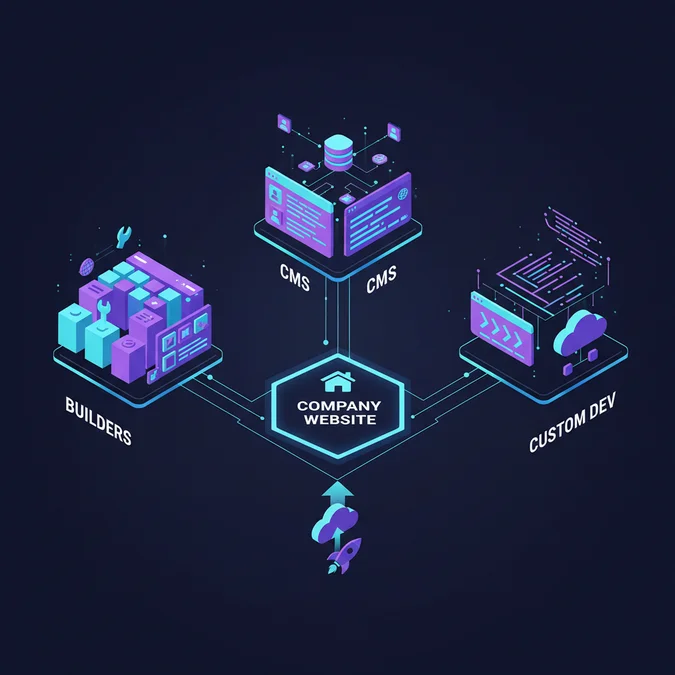

Creating a company website involves a pivotal decision between website builders, content management systems (CMS), or custom development, each offering distinct trade-offs in cost, flexibility, and technical control. Strategic planning, robust technical setup, compelling design, and continuous optimization are critical steps for establishing an effective and scalable online presence that meets specific business objectives.
This guide provides a practitioner-level overview, dissecting the architectural implications, implementation pathways, and long-term considerations for building a successful company website. We will explore the nuances of each approach, ensuring you can make an informed decision tailored to your organization’s unique requirements, technical proficiencies, and growth aspirations.
Strategic Blueprint: Defining Your Business Website’s Purpose and Audience
Before any code is written or platform selected, a clear strategic blueprint is essential for making a website for a small business or any enterprise. This initial phase defines the ‘why’ and ‘for whom,’ preventing costly rework and ensuring the final product aligns with overarching business goals. Without a well-articulated strategy, even the most technically advanced website can fail to deliver tangible value.
A website is not merely a digital brochure; it’s a dynamic business asset. Its effectiveness is directly proportional to the clarity of its strategic foundation.
Consider the following checklist to establish a robust strategic foundation:
- Define Primary Business Goals: What do you want your website to achieve? (e.g., lead generation, e-commerce sales, brand awareness, customer support, information dissemination). Quantify these goals where possible (e.g., ‘increase qualified leads by 20% in 12 months’).
- Identify Target Audience: Who are you trying to reach? Create detailed buyer personas including demographics, psychographics, pain points, and online behavior. Understanding your audience dictates design, content, and functionality.
- Analyze Competitors: Examine competitor websites. What works well? What are their weaknesses? Identify opportunities to differentiate your online presence and offer superior value.
- Outline Core Functionality: Based on goals and audience, list essential features (e.g., contact forms, e-commerce cart, blog, booking system, customer login, multilingual support). Distinguish ‘must-haves’ from ‘nice-to-haves.’
- Establish Budget and Timeline: Determine realistic financial allocations for development, design, content, hosting, maintenance, and marketing. Set a pragmatic timeline with key milestones.
- Plan for Content Strategy: What information will your website convey? Who will create it? How will it be organized? A content strategy should encompass text, images, videos, and calls-to-action (CTAs) for every anticipated website page.
- Consider Scalability and Future Growth: Anticipate how your business and its online needs might evolve. Will your chosen platform support future integrations, increased traffic, or expanded product lines without requiring a complete overhaul?
This strategic phase is the bedrock for all subsequent technical and creative decisions, ensuring that the development effort for your company website is focused and efficient.
Choosing Your Path: Website Builders, CMS, or Custom Development for Your Business
The decision of how to build a website for a business is fundamental, impacting everything from development costs and timeline to long-term flexibility and maintenance. There are three primary avenues: website builders, Content Management Systems (CMS), and custom development. Each offers a distinct balance of control, complexity, and capability.
Here’s a comparative analysis to help determine the most suitable approach for your specific business needs:
| Feature / Criterion | Website Builders (e.g., Wix, Squarespace) | Content Management Systems (e.g., WordPress, Drupal) | Custom Development (e.g., React/Node.js, Django/Python) |
|---|---|---|---|
| Technical Expertise Required | None to Low | Moderate (especially for advanced customization) | High |
| Cost (Initial) | Low (monthly subscription) | Moderate (hosting, premium themes/plugins, development services) | High (developer salaries, infrastructure) |
| Time to Market | Fast (days to weeks) | Moderate (weeks to a few months) | Slow (several months to a year+) |
| Design Flexibility | Limited to templates, some drag-and-drop customization | High (themes, custom CSS/JS, page builders) | Unlimited (pixel-perfect control) |
| Scalability | Limited by platform’s architecture | Good (with proper hosting and optimization) | Excellent (architected for specific needs) |
| Custom Functionality | Very Limited (rely on built-in apps) | Good (plugins, custom code integration) | Unlimited (build anything) |
| Maintenance & Security | Handled by platform provider | Requires active management (updates, backups, security plugins) | Requires dedicated development team/resources |
| SEO Capabilities | Basic to Good (platform dependent) | Excellent (with appropriate plugins and configuration) | Excellent (built-in best practices) |
| Ideal Use Cases | Small businesses, portfolios, personal sites, quick launches | Blogs, e-commerce, corporate sites, complex content sites | Unique business logic, high-performance applications, enterprise solutions |
Choosing the right path involves a careful evaluation of your budget, technical resources, desired functionalities, and long-term growth strategy. For instance, a startup needing a quick online presence might opt for a builder, while an established e-commerce business requiring specific integrations would lean towards a robust CMS or custom solution.
The Technical Foundation: Domain, Hosting, and Essential Setup for Your Website
Regardless of whether you choose a builder, CMS, or custom development, a robust technical foundation is paramount. This involves securing your digital address, providing a home for your website’s files, and configuring essential services to ensure accessibility and security. This foundation is where the concepts of domain hosting and web design converge with practical implementation.
- Domain Name Registration: Your domain name (e.g., yourcompany.com) is your website’s unique identifier on the internet. Choose a name that is memorable, relevant to your brand, and easy to type. Register it through reputable registrars like Namecheap, GoDaddy, or Google Domains. Ensure you control the domain and its DNS (Domain Name System) settings.
- Web Hosting Selection: Web hosting is the service that stores your website files and makes them accessible to users worldwide. The choice of hosting depends heavily on your website’s size, traffic expectations, and the platform you’re using.
- Shared Hosting: Most affordable, suitable for small sites with low traffic. Resources are shared with other websites on the same server.
- VPS (Virtual Private Server) Hosting: Offers more resources and control than shared hosting, suitable for growing businesses.
- Dedicated Hosting: Provides an entire server for your website, offering maximum performance and control, ideal for high-traffic or resource-intensive applications.
- Cloud Hosting: Scalable and flexible, distributing your website across multiple servers, offering high availability and performance on demand.
- Managed WordPress Hosting: Optimized specifically for WordPress, handling updates, backups, and security.
- SSL Certificate Implementation: An SSL (Secure Sockets Layer) certificate encrypts data transmitted between a user’s browser and your website, indicated by ‘https://’ in the URL and a padlock icon. This is crucial for security, user trust, and SEO. Many hosting providers offer free SSL certificates (e.g., Let’s Encrypt) or allow easy integration.
- DNS Configuration: Once you have a domain and hosting, you’ll need to point your domain name to your hosting server using DNS records. This typically involves updating ‘A records’ or ‘CNAME records’ in your domain registrar’s control panel to direct traffic to your web host.
- Email Hosting Setup: Establish professional email addresses using your domain name (e.g., info@yourcompany.com). Many hosting plans include email services, or you can integrate with third-party providers like Google Workspace or Microsoft 365.
- Backup Strategy: Implement a regular backup schedule for your website’s files and database. This is a critical safeguard against data loss due to technical failures, cyberattacks, or human error. Verify that backups are working and can be restored efficiently.
- Intuitive Navigation: Users should easily find what they’re looking for. Use clear labels, logical hierarchies, and consistent menu structures.
- Visual Hierarchy: Guide the user’s eye to important elements using size, color, contrast, and spacing.
- Readability: Choose legible fonts, appropriate line spacing, and sufficient contrast between text and background.
- Call-to-Action (CTA): Every page should have a purpose and a clear next step for the user. CTAs should be prominent and actionable.
- Targeted Messaging: Craft content that speaks directly to your target audience’s needs and pain points.
- Variety of Formats: Utilize text, images, videos, infographics, and interactive elements to keep users engaged.
- Clarity and Conciseness: Get to the point quickly. Users often scan before they read thoroughly.
- Originality and Value: Provide unique insights or solutions that differentiate your business.
- Keyword Research: Identify terms and phrases your target audience uses to find products or services like yours.
- On-Page SEO: Optimize individual website pages with relevant keywords in titles, meta descriptions, headings, and body content. Ensure images have descriptive alt text.
- Technical SEO: Ensure your site’s technical health, including mobile-friendliness, site speed, XML sitemaps, and proper use of canonical tags. This is heavily influenced by your initial domain hosting and web design choices.
- Content Marketing: Regularly publish valuable blog posts, articles, or resources that address user queries and establish your authority.
- Link Building: Acquire high-quality backlinks from other reputable websites, signaling to search engines that your site is a trusted resource.
- Content Review: Proofread all text for grammar, spelling, and factual accuracy. Verify images and videos are correctly displayed and optimized.
- Functionality Testing: Test all forms, links, buttons, and dynamic features across different browsers and devices. Ensure e-commerce checkout processes are flawless.
- Performance Testing: Use tools like Google PageSpeed Insights or GTmetrix to check loading speeds. Optimize images, leverage browser caching, and consider a Content Delivery Network (CDN).
- Security Audit: Confirm SSL is active, firewalls are configured, and robust password policies are in place. Scan for vulnerabilities.
- SEO Review: Check meta titles, descriptions, heading structure, and alt tags. Ensure an XML sitemap is generated and submitted to search engines.
- Analytics Setup: Verify Google Analytics, Google Search Console, or other tracking tools are correctly implemented to monitor traffic and user behavior.
- Legal Compliance: Ensure privacy policies, terms of service, and cookie consent banners are present and compliant with relevant regulations (e.g., GDPR, CCPA).
- Performance Monitoring: Regularly check site speed and server response times. Optimize databases and code for efficiency.
- Content Updates: Keep your content fresh, relevant, and accurate. Regularly publish new blog posts, news, or product updates.
- Security Patches & Updates: For CMS platforms, regularly update core software, themes, and plugins. For custom sites, apply security patches and monitor for new vulnerabilities.
- User Feedback & A/B Testing: Collect user feedback through surveys or heatmaps. Conduct A/B tests on landing pages, CTAs, or design elements to improve conversion rates.
- SEO Monitoring & Refinement: Track keyword rankings, organic traffic, and backlink profiles. Adapt your SEO strategy based on performance data and algorithm changes.
- Broken Link Checks: Periodically scan for broken internal and external links that can harm user experience and SEO.
- Strong Passwords & Multi-Factor Authentication (MFA): Enforce complex passwords for all administrative accounts and enable MFA wherever possible.
- Regular Backups: Automate daily or weekly backups and store them off-site. Test restoration processes periodically.
- Firewall & DDoS Protection: Implement web application firewalls (WAFs) and utilize DDoS protection services.
- SSL/TLS Encryption: Ensure all data transmission is encrypted with up-to-date SSL/TLS certificates.
- Software Updates: Keep all software (OS, web server, CMS, plugins, libraries) patched to the latest secure versions.
- Vulnerability Scanning: Regularly scan your website for known vulnerabilities.
- Access Control: Restrict administrative access to essential personnel and use the principle of least privilege.
- Project complexity and required features
- Choice of platform (website builder, CMS, custom development)
- Design sophistication and custom UI/UX
- Content creation (text, images, video)
- Integration with third-party systems (CRM, ERP, payment gateways)
- Ongoing maintenance, security, and updates
- Marketing and SEO efforts post-launch
Properly setting up these foundational elements ensures your website is stable, secure, and ready to serve your audience effectively. It’s a critical aspect of effective domain hosting and web design planning.
Crafting Your Digital Presence: Web Design, Content, and SEO for Every Website Page
With the technical foundation in place, the focus shifts to the user-facing aspects: how your website looks, what it communicates, and how easily it can be discovered. Effective web design, compelling content, and robust SEO are interdependent elements crucial for the success of every website page and the overall digital presence. The interplay between domain hosting and web design decisions significantly impacts user experience and search engine visibility.
Responsive Web Design and User Experience (UX)
Modern web design prioritizes responsiveness, ensuring your website adapts seamlessly to various screen sizes, from desktops to tablets and smartphones. A mobile-first approach is now standard. Beyond aesthetics, UX focuses on usability: intuitive navigation, clear calls-to-action (CTAs), fast loading times, and accessibility for all users.
Compelling Content Strategy
Content is the information and media that fills your website. High-quality, relevant, and engaging content is vital for attracting and retaining visitors. It directly supports your business goals, whether it’s educating customers, driving sales, or building brand authority.
Search Engine Optimization (SEO)
SEO is the practice of optimizing your website to rank higher in search engine results, driving organic traffic. Beyond basic keyword integration, modern SEO encompasses technical, on-page, and off-page strategies.
By meticulously crafting each website page with these principles in mind, you create a powerful digital asset that not only looks good but also performs effectively in the competitive online landscape.
Launch, Optimize, and Secure: Ensuring Long-Term Success and Scalability
Launching a company website is not the end of the journey; it’s merely the beginning. Long-term success hinges on continuous monitoring, optimization, and robust security measures. This ongoing process is critical to ensure your investment in how to create a company website continues to yield returns, maintaining performance, user satisfaction, and protection against evolving threats.
Pre-Launch Checklist:
Before making your website live, a thorough review is non-negotiable:
Post-Launch Optimization and Maintenance:
A website is a living entity that requires continuous care:
Website Security Best Practices:
Protecting your website and user data is paramount. A security breach can severely damage reputation and incur significant costs.
Example of a basic security header for a custom website (or configurable in a CMS via `.htaccess`):
Header always set Content-Security-Policy "default-src 'self'; script-src 'self' 'unsafe-inline' https://www.google-analytics.com; object-src 'none'; style-src 'self' 'unsafe-inline'; img-src 'self' data:; font-src 'self'; connect-src 'self' https://www.google-analytics.com; base-uri 'self'; form-action 'self'"
Header always set X-Frame-Options "DENY"
Header always set X-Content-Type-Options "nosniff"
Header always set X-XSS-Protection "1; mode=block"
Header always set Referrer-Policy "no-referrer-when-downgrade"
Header always set Strict-Transport-Security "max-age=31536000; includeSubDomains; preload"
By integrating these practices into your operational workflow, you ensure that your company website remains a secure, high-performing, and scalable asset contributing to your business’s sustained growth.
Factors That Affect Development Cost
The total cost for a company website varies significantly based on these factors, ranging from minimal monthly fees for basic builders to substantial investments for enterprise-grade custom solutions.
Frequently Asked Questions
What is the typical cost to create a company website?
The cost to create a company website varies widely, from a few hundred dollars for a basic builder site to tens of thousands for custom development. Factors include design complexity, features, content, and ongoing maintenance. A mid-range CMS site often falls between $2,000 and $10,000, depending on customization and professional services.
How long does it take to build a business website?
Building a business website can take anywhere from a few days for a simple site using a website builder to several months for a complex, custom-developed platform. The timeline depends on project scope, content readiness, design revisions, and the chosen development method. Expect longer for bespoke features and extensive content.
Can I start a business solely based on a website?
Yes, many successful businesses operate entirely online, often referred to as ‘website businesses.’ These can include e-commerce stores, SaaS platforms, content sites, or service-based businesses. Success hinges on a strong business model, effective marketing, and a well-designed, functional website that meets customer needs.
What are the essential elements of a professional company website page?
A professional company website page typically includes clear navigation, high-quality content (text, images, video), a strong call-to-action, contact information, and mobile responsiveness. Key elements also involve fast loading speeds, robust security, and accessibility features for all users to ensure a positive experience and effective communication.
What should you consider regarding how to start a website business?
When assessing how to start a website business, prioritize measurable technical outcomes, transparent communication, and experienced engineering guidance to ensure maximum ROI.
Creating a company website is a multi-faceted endeavor that extends far beyond initial development. It demands a strategic vision, a well-informed choice of platform, meticulous technical setup, compelling design, and an unwavering commitment to ongoing optimization and security. By approaching this process systematically, from defining clear business goals to implementing robust maintenance protocols, businesses can establish a powerful and effective online presence.
The longevity and success of your digital platform depend on continuous adaptation and a deep understanding of user needs and technological advancements. Whether leveraging the simplicity of a website builder, the flexibility of a CMS, or the bespoke power of custom development, the principles of strategic planning, technical excellence, and user-centric design remain paramount for achieving your business objectives in the digital realm.
NR Studio builds custom web apps, mobile apps, SaaS platforms, and internal tools for growing businesses. If you’re working through a technical decision, feel free to reach out — no commitment required.