
Imagine constructing a skyscraper in the heart of a bustling city. You have two choices: hire a traditional construction crew that relies on manual blueprints and physical labor, or deploy a fleet of autonomous robotic units capable of interpreting architectural intent, self-correcting structural errors in real-time, and accelerating the foundation-laying phase by several orders of magnitude. For a modern startup founder, the software stack is the foundation, and the rise of AI-assisted development tools represents that leap from manual labor to autonomous precision.
However, the market is currently saturated with tools that claim to replace the need for deep technical expertise. As a CTO, I view these claims with healthy skepticism. The reality is that tools like Cursor, Replit, and Claude Code are not replacements for architectural oversight; they are force multipliers for engineers who already understand the underlying logic of the systems they are building. Choosing the right tool requires evaluating how each integrates into your existing development lifecycle, its impact on technical debt, and the specific cognitive load it offloads from your team.
The Architectural Philosophy of Cursor
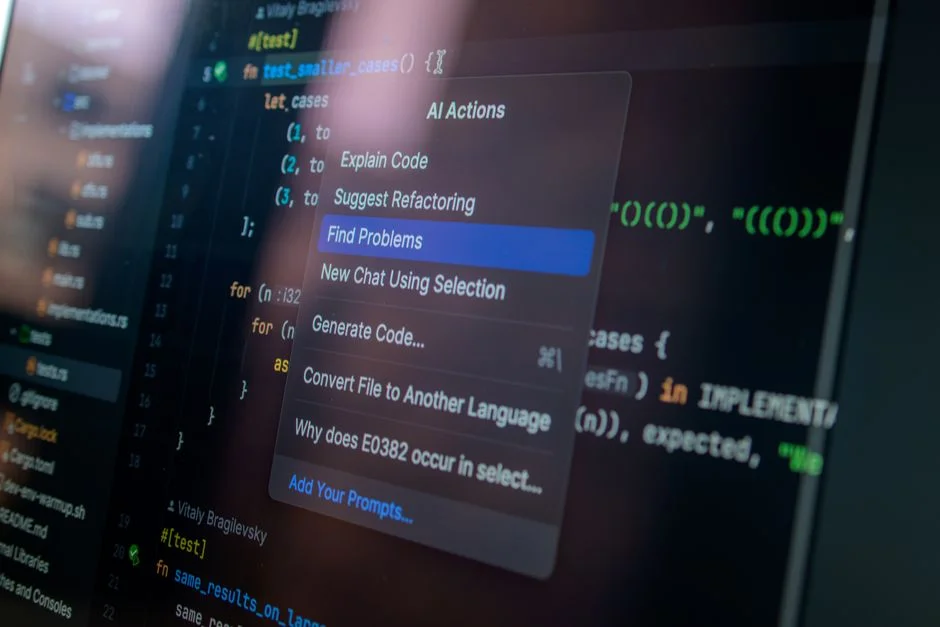
Cursor has emerged as the industry standard for AI-integrated development environments (IDEs) because it fundamentally respects the developer’s workflow. Unlike browser-based alternatives, Cursor is a fork of VS Code, which is critical for teams that rely on the vast ecosystem of extensions, linters, and debugging tools that have made VS Code the dominant platform for professional software development. When you adopt Cursor, you are not learning a new paradigm; you are upgrading your existing text editor with a deep-context engine that understands your entire codebase.
The primary advantage of this architectural approach is the implementation of Retrieval Augmented Generation (RAG) at the local file system level. When you query Cursor, it does not just look at the open file; it indexes your entire project repository, allowing the AI to understand dependencies, class hierarchies, and cross-module imports. This is essential for managing technical debt in complex projects. By providing the model with a clear map of your architecture, Cursor reduces the incidence of hallucinated function calls or missing imports that frequently plague broader, less context-aware AI assistants. For a founder, this means less time spent debugging AI-generated code and more time iterating on features that directly impact business outcomes.
Furthermore, Cursor’s implementation of ‘Composer’ allows for multi-file edits, a feature that is non-negotiable for anyone building a production-grade application. If you need to refactor a service layer that affects five different controllers, Cursor can propose changes across all five files simultaneously, ensuring structural consistency. This level of automation is what differentiates a toy project from a scalable product. By maintaining the IDE as the primary interface, Cursor allows your team to maintain their muscle memory while benefiting from an AI co-pilot that treats the codebase as a single, unified organism rather than a collection of isolated snippets.
Replit and the Paradigm of Ephemeral Development Environments
Replit represents a radical departure from the local-first development model. By moving the entire development environment into the browser and pairing it with integrated hosting, Replit targets the ‘idea-to-deployment’ cycle. For founders, this is particularly potent during the prototyping phase. When you are validating a concept, the overhead of setting up Docker containers, managing environment variables, and configuring CI/CD pipelines can be a significant drag on velocity. Replit abstracts these concerns, allowing you to focus entirely on the application logic.
The integration of ‘Replit Agent’ takes this a step further by automating the setup of the infrastructure itself. You can describe an application, and the platform will provision the database, configure the server, and deploy the frontend. This is exceptionally useful for rapid iteration cycles where the cost of infrastructure management would otherwise outweigh the value of the prototype. However, the trade-off is clear: as your application scales, you may encounter the ‘scaling wall’ where the proprietary environment constraints of Replit become a bottleneck. Once your application requires complex, custom-configured cloud infrastructure—such as specific VPC configurations, private subnets, or specialized database clustering—the abstraction provided by Replit can start to feel like a limitation.
For startups, the decision to use Replit should be based on the project’s lifecycle stage. It is an unparalleled tool for building MVPs and internal tools where the primary goal is speed to market. When you compare this to a local setup where a developer might spend two days just getting the local environment to match production, Replit’s value proposition is immediately visible. Yet, the architectural risk remains: you are building on a platform that mediates your access to the underlying hardware and network layer. If your product roadmap eventually requires granular control over the runtime environment, you will need a clear migration path to a more traditional cloud-native setup.
Claude Code and the Rise of CLI-First AI Agents
Claude Code represents the shift toward autonomous CLI-first agents. Unlike Cursor or Replit, which provide a UI-based interface for interaction, Claude Code is designed to operate directly within the terminal, executing commands, reading files, and running tests. This is a powerful tool for power users who prefer to stay within the shell. By interacting directly with the file system and the terminal, Claude Code can handle tasks like running migrations, executing test suites, and performing git operations without leaving the command line context.
The power of this approach lies in its ability to execute ‘Chain of Thought’ processes in an environment that is already familiar to senior engineers. When you instruct Claude Code to fix a failing test, it doesn’t just suggest code; it runs the test, observes the failure, reads the logs, adjusts the code, and re-runs the test. This loop is the closest approximation we currently have to a junior developer who can work autonomously on small tasks. For a founder, this is a significant operational shift. It moves the human developer from being a ‘writer’ of code to an ‘editor’ and ‘orchestrator’ of agents.
However, the risk with CLI-based agents is the lack of visual oversight. In a GUI-based environment like Cursor, you can see the diffs, visualize the project structure, and manually intervene before applying changes. With a CLI agent, you are relying heavily on the robustness of your test suite. If your automated testing coverage is low, allowing an autonomous agent to modify your codebase via the terminal is a recipe for silent regressions. Therefore, deploying Claude Code requires a baseline of high-quality automated testing. If you are not testing, you are effectively flying blind, and the agent may be introducing subtle bugs that will only manifest in production, leading to significant technical debt that is far costlier to fix than the time saved by the agent.
Managing Technical Debt in an AI-Assisted Environment
One of the most insidious risks of adopting these tools is the accumulation of ‘AI-generated technical debt.’ AI models are trained on vast datasets that include both high-quality code and legacy, anti-pattern-heavy code. When an agent generates a solution, it often defaults to the most statistically probable implementation rather than the most maintainable or secure one. Over time, this can lead to a codebase that looks clean on the surface but is structurally fragile.
To mitigate this, founders must enforce strict code review processes even when the code is generated by AI. The role of the human developer is shifting from ‘creator’ to ‘reviewer.’ You must ensure that your team is not just blindly accepting AI suggestions but is actively verifying them against your project’s architectural standards. This means setting up linting rules, static analysis tools, and mandatory code reviews for every PR, regardless of whether it was authored by a human or an AI agent.
Furthermore, avoid the trap of ‘prompt-driven development’ where the focus is on the prompt rather than the design. A well-designed system is defined by its boundaries, interfaces, and data flow. If you use AI to create a monolithic mess, you will eventually have to spend significant resources refactoring it. Use AI to speed up the implementation of well-defined components, but keep the high-level architecture in the hands of experienced human engineers. The goal is to use these tools to build better systems faster, not to build faster systems that are inherently broken.
The Hybrid Approach: Orchestrating a Multi-Tool Strategy
A sophisticated engineering organization rarely relies on a single tool. The most effective strategy for a startup is to leverage the strengths of each platform across different stages of the development lifecycle. For instance, you might use Replit for rapid experimentation and initial prototyping to validate a business idea. Once the core value proposition is proven and you are ready to transition to a production-ready repository, you move that codebase into a local environment managed by Cursor.
Within the Cursor environment, you can then integrate Claude Code for specific CLI-based tasks, such as automating the execution of repetitive test suites or running complex database migrations that require multiple sequential steps. This hybrid approach allows you to maintain the speed of a low-code/no-code environment during discovery while ensuring you have the full power of a professional-grade IDE during the delivery and maintenance phases. This is how you optimize for both velocity and long-term maintainability.
The key to success here is interoperability. Ensure that your development environment is portable. By using standard git workflows and containerization (like Docker), you ensure that your code is not locked into any single AI vendor’s ecosystem. If you build your entire product inside Replit’s proprietary environment, you are essentially tied to their platform. By maintaining a local repository that can be opened in Cursor, VS Code, or any other editor, you retain the architectural freedom to switch tools as the technology evolves or as your team’s needs change.
Security and Data Privacy Considerations
For founders in highly regulated industries like healthcare or finance, data privacy is the primary constraint. When you use AI coding tools, you are essentially feeding your codebase into a Large Language Model (LLM). You must understand the data retention and training policies of each provider. Does your codebase become part of the training set for the next iteration of the model? Is your intellectual property protected?
Most enterprise-grade AI tools now offer ‘opt-out’ of data training, which is a mandatory requirement for any professional software business. Before deploying any of these tools across your team, you should audit the privacy policy to ensure that your proprietary logic is not being leaked or used to train public models. Furthermore, consider the risk of hard-coded secrets. AI agents, when tasked with refactoring, might accidentally expose environment variables or API keys if they are not properly configured to respect `.gitignore` or secret management systems.
I recommend implementing a strict ‘no-secrets-in-code’ policy, utilizing tools like Vault or AWS Secrets Manager, and ensuring that your AI tools are configured to never index or transmit sensitive configuration files. By treating your AI agents as untrusted third-party contractors, you can maintain a security posture that protects your intellectual property while still benefiting from the productivity gains that these tools provide. Always assume that data sent to an LLM is visible to the provider, and act accordingly.
Performance Benchmarks and Real-World Velocity
While it is tempting to look for ‘performance benchmarks’ for these tools, the reality is that the performance gain is entirely dependent on the quality of the developer’s prompts and the clarity of the codebase. A senior engineer using Cursor to refactor a well-documented module will see a massive increase in velocity, while a junior developer using the same tool to build a feature without understanding the underlying requirements will likely create a mess that takes twice as long to debug.
Velocity is not just about lines of code generated; it is about the reduction in ‘time-to-first-working-prototype’ and the ‘time-to-bug-fix.’ In practice, teams using AI-integrated workflows typically see a 30-50% reduction in the time required to scaffold new features. However, the time required for testing and code review often increases, as the volume of code produced is higher. The net gain is positive, provided that your team is disciplined about testing.
When evaluating these tools, ignore the marketing hype around ‘coding speed.’ Instead, track the ‘cycle time’ of your pull requests. If your cycle time is decreasing, your tool selection is working. If your cycle time is increasing because your team is spending more time fixing AI-generated bugs, you are likely over-relying on the AI’s output without sufficient human oversight. Use your metrics to guide your adoption, not the vendor’s claims.
The Role of Human Oversight in Autonomous Development
We are entering an era of ‘Autonomous Development,’ but it is crucial to define what that means. It does not mean the absence of human engineers. It means the transition of the human engineer from a ‘tactical implementer’ to a ‘strategic architect.’ The AI can write the boilerplate, the unit tests, and the CRUD endpoints, but it cannot make the high-level architectural decisions regarding system design, scalability, or data consistency.
If you allow the AI to make those decisions, you are abdicating your responsibility as a founder. The AI doesn’t care about your long-term maintenance costs or your ability to scale to millions of users. It cares about completing the current prompt. Therefore, your role is to provide the guardrails. You must define the patterns, the libraries, and the standards that the AI must follow. By providing a clear ‘style guide’ or a reference architecture in your prompt, you can ensure that the AI’s output aligns with your business needs.
Always maintain a ‘human-in-the-loop’ for critical path code. The AI should never be allowed to merge code directly to production without a human review. This is not just a safety measure; it is a quality assurance measure. The more you treat the AI as a junior developer who needs constant supervision, the better your codebase will remain. As the technology matures, you can increase the autonomy of your agents, but only as your confidence in their output and your ability to verify that output grows.
Common Mistakes When Integrating AI Coding Tools
One of the most common mistakes I see is the ‘over-automation’ of early-stage code. Founders often try to use AI to generate the entire application structure before they have even validated the core logic. This leads to a bloated, unmaintainable codebase that is difficult to change when the product requirements inevitably shift. Start small. Use AI to solve specific, well-defined problems, not to build the entire system from scratch.
Another common error is the lack of context. If you throw a 50,000-line codebase at an AI without any instructions on your design patterns, you will get inconsistent results. You must curate the context. Use tools that allow you to specify which files or folders are relevant to the current task. By limiting the scope of the AI’s awareness to the relevant modules, you significantly improve the quality of its output and reduce the chance of hallucinations.
Finally, avoid the ‘black box’ trap. If you don’t understand the code the AI has generated, do not merge it. If you cannot explain how a piece of code works, you cannot maintain it when it breaks. The AI might provide the initial implementation, but you must own the understanding of that implementation. If you find yourself frequently saying ‘I don’t know why this works, but it does,’ you are creating a significant liability for your company.
Future-Proofing Your Development Workflow
To future-proof your workflow, focus on decoupling your development environment from your AI provider. As the field advances, new models and new tools will emerge. If your entire workflow is built on a proprietary platform, you will be trapped. If your workflow is built on standard open-source tools with AI as an overlay, you can easily swap out the underlying model or the agent framework as better alternatives appear.
Adopt a ‘model-agnostic’ mindset. Use tools that allow you to connect different LLMs, such as Claude 3.5 Sonnet or GPT-4o, depending on the specific task. Some tasks require high reasoning capabilities, while others require speed and efficiency. Being able to switch models is a competitive advantage. Keep your infrastructure as code, your documentation updated, and your testing suite robust. These are the foundations of any resilient engineering organization, regardless of the tools you use.
Lastly, invest in your team’s ability to ‘prompt engineer.’ The skill of the future is not just writing code; it is writing the instructions that guide the creation of code. Train your engineers to be clear, concise, and structured in their communication with AI. The ability to translate business requirements into technical specifications that an AI can execute is the most valuable skill a developer can possess in the next decade.
Factors That Affect Development Cost
- Developer team size
- Complexity of existing codebase
- Need for enterprise security and data privacy
- Frequency of deployment cycles
Costs vary significantly based on the number of seats and the level of enterprise support required for secure AI implementations.
Frequently Asked Questions
Is Replit better than Claude for coding?
Replit is a complete platform for building and hosting apps in the browser, while Claude Code is a CLI agent for interacting with local code. Replit is better for rapid prototyping, while Claude Code is better for augmenting a local, professional development workflow.
Is Cursor AI better than Claude for coding?
Cursor is an IDE that integrates AI directly into your editor, providing a GUI-based experience with deep context. Claude Code is a terminal-based agent that focuses on command-line execution. Cursor is generally superior for complex, multi-file software projects, while Claude Code excels at task-specific automation.
What are the top 5 AI tools for coding?
The top tools currently include Cursor, Replit, Claude Code, GitHub Copilot, and Windsurf. Each serves a different part of the development lifecycle, ranging from IDE integration to autonomous CLI agents.
Is there any better AI for coding than Claude?
Claude 3.5 Sonnet is currently considered the industry leader for coding tasks due to its reasoning capabilities. However, tools like OpenAI’s o1 are highly competitive, and the ‘best’ AI depends on whether you value raw reasoning, speed, or context window size.
Choosing between Cursor, Replit, and Claude Code is not a matter of picking a winner; it is a matter of aligning your development tools with your current operational stage. For rapid prototyping, the browser-based abstraction of Replit is hard to beat. For long-term production development, the IDE-centric, context-aware power of Cursor is the professional choice. And for those who live in the terminal and want to automate complex workflows, Claude Code offers an unparalleled level of autonomy.
The successful founder will not view these tools as replacements for engineering talent, but as the lever that allows a small team to achieve the output of a much larger one. By maintaining architectural control, enforcing rigorous testing, and treating AI as an assistant rather than an oracle, you can build a sustainable, scalable business that thrives in the age of AI-assisted development.
Not Sure Which Direction to Take?
Book a 30-minute call with one of our engineers — we’ll help you decide without the sales pitch.