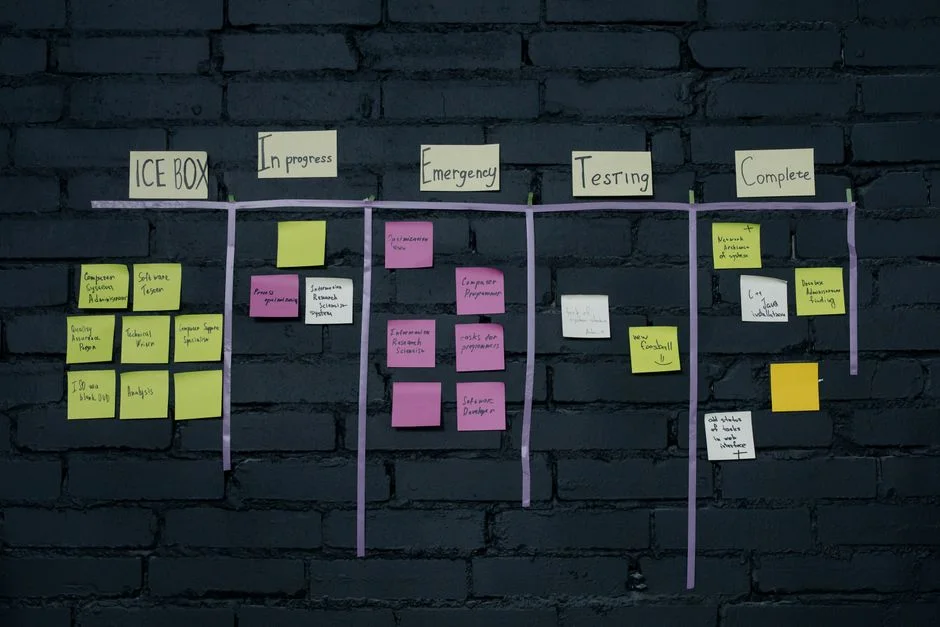

In modern web interface design, the kanban board represents a complex state management challenge disguised as a simple UI pattern. For engineering teams, the implementation involves more than just visual drag-and-drop mechanics; it requires a robust reconciliation strategy for state synchronization, high-frequency DOM updates, and predictable behavior across diverse device inputs. When building these systems, the primary objective is to minimize layout shifts and ensure that the underlying data model remains the single source of truth, regardless of how rapidly a user rearranges their workflow.
We favor dnd-kit over legacy alternatives because of its modular architecture and headless nature. By decoupling the interaction logic from the presentation layer, we can maintain strict control over our component lifecycle while leveraging Tailwind CSS for atomic, responsive styling. This article examines the architectural decisions, state management patterns, and performance considerations required to build a production-grade kanban board that scales without introducing unnecessary technical debt.
Architectural Foundation and State Management
The core difficulty in building a kanban board is not the drag-and-drop animation itself, but the synchronization of the application state with the DOM. When you move an item from column A to column B, you must update the data model, trigger a re-render, and maintain focus consistency. Using dnd-kit, we treat the board as a collection of SortableContext providers. Each column acts as a container that holds a set of items, and the entire board is wrapped in a DndContext.
To achieve high performance, we avoid storing the entire board state in a single, monolithic object that triggers global re-renders. Instead, we implement a normalization pattern where items are stored in a map, and columns contain only arrays of IDs. This approach ensures that moving an item only triggers a re-render for the affected columns rather than the entire application. We define our data structure as follows:
interface BoardState { columns: Record<string, string[]>; items: Record<string, Item>; }By utilizing useSensor and useSensors hooks, we explicitly define how the system handles different input modalities—mouse, keyboard, and touch. This is critical for accessibility. A common mistake is failing to provide keyboard navigation for drag-and-drop operations, which renders the application unusable for many users. By configuring KeyboardSensor, we ensure that users can rearrange tasks using only their keyboard, adhering to WCAG standards while maintaining the same logical flow as mouse-driven interactions.
Leveraging dnd-kit for Modular Interactions
dnd-kit is fundamentally different from older libraries because it provides a set of low-level primitives rather than a rigid, opinionated implementation. This is a significant advantage for CTOs looking to reduce long-term maintenance costs. Since the library does not dictate how your components look, you have complete freedom to define your own Tailwind classes. The library provides the useSortable hook, which injects necessary event listeners and visual attributes into your components. This hook is the engine of the interaction.
When implementing the drag-over and drag-end events, we must distinguish between moving an item within the same column versus moving it across columns. The onDragOver event allows us to handle the visual feedback of an item moving between columns in real-time, while onDragEnd handles the final state persistence to the backend. The logic for calculating the new index when dropping an item is notoriously tricky. We use dnd-kit‘s built-in collision detection algorithms, such as closestCenter or rectIntersection, which are highly optimized to handle overlapping containers.
Consider the following implementation detail: when an item is being dragged, it should be visually detached from the list. We use the DragOverlay component to render a ghost version of the item during the interaction. This prevents the layout from collapsing or flickering while the item is in transit. By styling this overlay with Tailwind‘s shadow and scale utilities, we create a polished, tactile feel that is essential for user engagement in project management software.
Styling with Tailwind for Responsive Layouts
Tailwind CSS is particularly effective for kanban boards due to its ability to handle dynamic grid layouts. A kanban board is essentially a flexbox or grid container where columns are arranged horizontally. As the number of columns increases, the board must remain responsive without breaking. We use overflow-x-auto on the board container and flex-shrink-0 on the columns to ensure they maintain their width even on smaller screens.
One of the challenges with drag-and-drop is managing the visual state of the “drop zone.” Using Tailwind’s arbitrary variants, we can define styles that activate when a column is a valid drop target. For example, applying bg-blue-50/50 or a dashed border when a column is being hovered over provides immediate visual confirmation to the user. This is done by passing a state flag into the column component and conditionally applying classes:
<div className={`p-4 ${isOver ? 'bg-blue-50 border-2 border-dashed' : 'bg-gray-100'}`} />Furthermore, we must consider the performance implications of CSS transitions. While Tailwind makes it easy to add transition-all to elements, applying these to every item in a large list can lead to performance degradation during a re-order. We limit transitions to specific properties like transform and opacity to ensure the browser’s compositor thread can handle the animations efficiently, preventing jank during rapid drag operations.
Handling Complex Data Synchronization
In a production application, the UI is just one side of the coin. The primary technical debt often arises from the gap between UI state and server state. When a user moves a card, the request to update the database must be processed without blocking the UI. We implement an optimistic UI update pattern. When the drag operation ends, we immediately update the local state to reflect the change, providing instant feedback. Simultaneously, we trigger an asynchronous API call to persist the new order.
If the API call fails, we must be prepared to roll back the state. This requires a robust error handling layer that can revert the local state to the last known good configuration. We use a Ref or a temporary state snapshot to track the previous order of items. This pattern is essential for maintaining data integrity in multi-user environments where another user might be modifying the same column concurrently.
To further optimize, we batch these updates. If a user quickly moves an item across three columns, we shouldn’t trigger three separate API requests. Instead, we debounce the persistence logic, ensuring that we only send the final state of the card’s position to the server. This reduces server load and prevents race conditions that could lead to inconsistent board states.
Performance Optimization for Large Boards
As boards grow to contain hundreds of cards, performance becomes a bottleneck. React’s default re-render behavior can be costly if every card in the list re-renders when one card is moved. We mitigate this by memoizing components using React.memo and carefully managing the dependencies of our hooks. Each card should only re-render if its specific data props change or if the drag status of the board changes.
Another common pitfall is the misuse of context providers. If we pass the entire board state through a context, any change to that state forces every consumer to re-render. We use a more granular approach: the board container manages the high-level state, and individual columns receive only the data they need. By keeping the logic isolated within the column components, we minimize the scope of updates. This is a standard practice when optimizing complex interfaces to ensure the main thread remains responsive.
We also monitor the number of event listeners attached to the DOM. dnd-kit handles this well by using delegation where possible, but if we attach custom listeners to every card, we can quickly hit browser memory limits. We keep our component tree flat and avoid deeply nested structures that increase the complexity of the reconciliation process during drag operations.
Accessibility and Inclusive Design
Accessibility is not an optional feature; it is a core requirement for enterprise-grade software. A kanban board is inherently visual, which makes it challenging for screen reader users. We must provide accessible labels for all drag-and-drop actions. When a user initiates a drag, we provide screen reader announcements regarding the current position of the item and the available drop targets. dnd-kit provides a screen reader sensor that can be configured to read these updates aloud.
Beyond screen readers, we ensure that the keyboard focus order is logical. When an item is moved, the focus should follow the item to its new position or remain in a predictable location. We avoid using hidden inputs or non-semantic elements for drag handles. Instead, we use standard button elements with appropriate aria-describedby attributes to explain the drag-and-drop functionality to the user. This level of detail ensures that our tools are available to all users, regardless of their input method.
Testing for accessibility involves more than automated tools. We conduct manual audits using screen readers like NVDA or VoiceOver to ensure that the interaction flow is not just functional, but intuitive. If a user cannot understand where a card is being moved, the tool fails its primary business purpose of organizing work.
Monitoring and Observability in Real-Time Interfaces
Even with a well-built board, identifying performance regressions in the field is difficult. We integrate telemetry to track the duration of drag operations and the latency of state synchronization. By monitoring these metrics, we can identify if specific users on lower-end devices are experiencing significant lag. This allows us to adjust our animation strategies or throttle updates based on the user’s hardware capabilities.
Observability also extends to backend performance. When a drag operation triggers a database write, we track the execution time of that request. If the time exceeds a certain threshold, we identify it as a bottleneck and optimize the query or add a caching layer. This proactive approach to monitoring ensures that the board remains fast and responsive as the application grows, allowing us to maintain a high level of team velocity.
We also log errors in the drag-and-drop state transitions. Since these interactions are complex, edge cases are inevitable. By capturing the state of the board at the time of an error, we can reproduce and fix bugs quickly, preventing them from becoming long-term technical debt.
Integration with Professional Development Workflows
Building a kanban board is rarely an isolated task. It is often part of a larger project management suite. To ensure long-term viability, we design the board component to be highly reusable. By defining clear interfaces for the data model, we can swap out the backend implementation or integrate it with other parts of the application, such as reporting dashboards or notification systems. This modularity is key to avoiding the “spaghetti code” that often plagues custom-built interfaces.
We also emphasize the importance of documentation within the codebase. Every complex interaction, especially those involving the dnd-kit sensor configuration, is documented with clear comments explaining the “why” behind the code. This reduces onboarding time for new engineers and ensures that the system is maintainable by the team over the long term. By treating the board as a core piece of infrastructure rather than a one-off feature, we ensure it serves the business for years to come.
Finally, we encourage teams to think about how this board integrates with their broader development environment. Whether you are building a custom task manager or a sophisticated tracking system, the principles of normalized state, performant rendering, and accessible design remain the same. [Explore our complete Software Development directory for more guides.](/topics/topics-software-development/)
Frequently Asked Questions
Why choose dnd-kit over react-beautiful-dnd?
dnd-kit is built as a set of modular, headless primitives that offer better performance and flexibility compared to react-beautiful-dnd. It is actively maintained and supports modern React patterns, making it a more future-proof choice for complex applications.
How do I handle large lists in dnd-kit?
For large lists, you should memoize your individual card components and ensure your state updates are normalized. Avoid passing large objects into context; instead, use granular state management to minimize re-renders.
Is Tailwind CSS suitable for complex drag and drop?
Yes, Tailwind CSS is highly effective for drag-and-drop interfaces because it allows for rapid, consistent styling of dynamic elements. Its utility-first approach makes it easy to conditionally apply classes based on the drag state.
How can I ensure accessibility in a kanban board?
Ensure all drag-and-drop actions are keyboard-accessible, provide clear aria-labels, and use screen reader sensors provided by dnd-kit. Testing with tools like NVDA or VoiceOver is essential for verifying the user experience.
Building a kanban board with dnd-kit and Tailwind is a sophisticated undertaking that requires balancing UI responsiveness with data integrity. By focusing on normalized state structures, granular re-rendering, and robust accessibility, you can create a high-performance tool that enhances rather than hinders your team’s workflow. The key to success lies in treating the drag-and-drop interaction as a first-class citizen of your application architecture.
If you are looking to scale your development efforts or need support with complex frontend architectures, our team is ready to assist. We focus on building software that is maintainable, scalable, and tailored to your specific business requirements. Keep an eye on our latest updates for more technical deep dives.
NR Tech Studio builds custom web apps, mobile apps, SaaS platforms, and internal tools for growing businesses. If you’re working through a technical decision, feel free to reach out — no commitment required.